SmartBuzzerAccessrightfromyourPhone
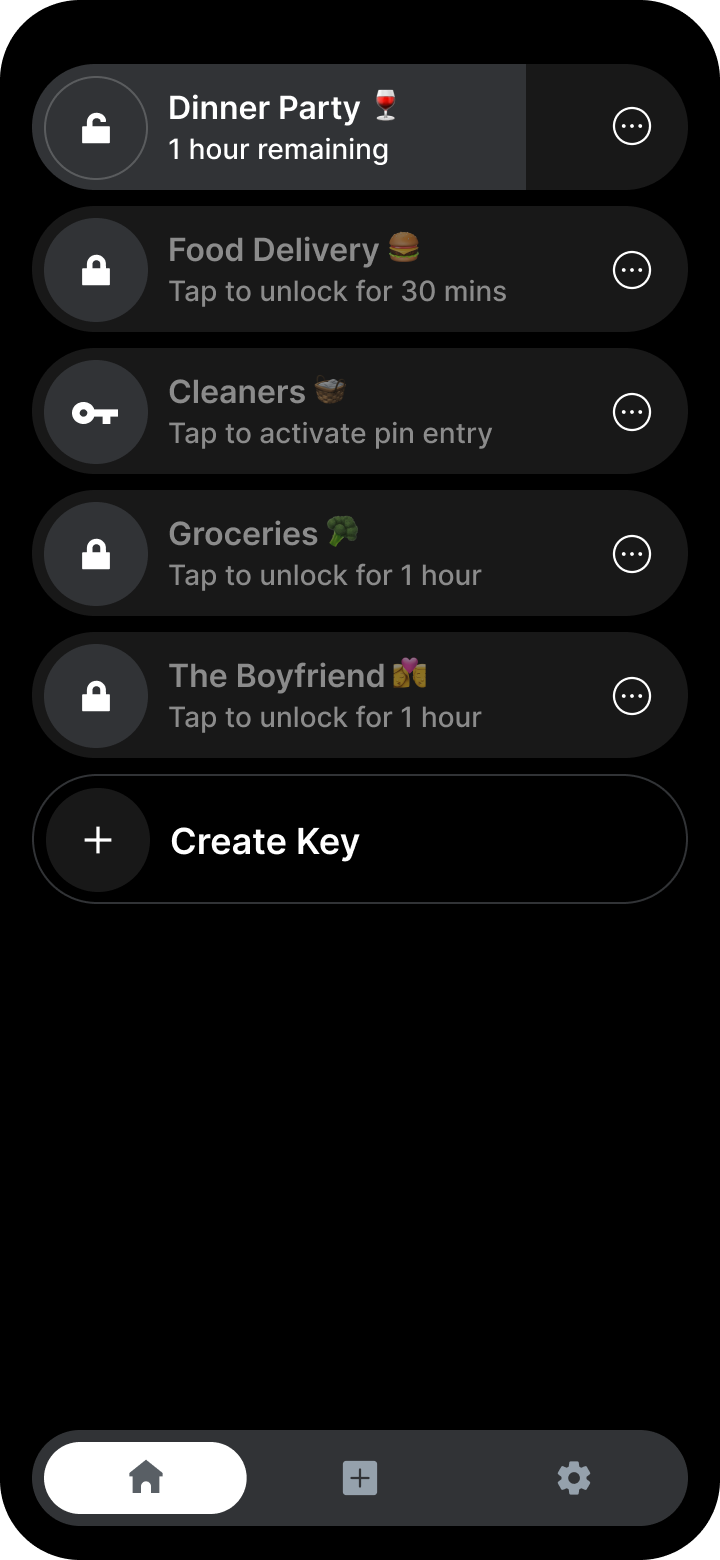
Enterkey is a smart buzzer entry app that connects to your building's apartment entry system, letting you buzz in guests from anywhere. It works with your existing buzzer apartment setup, no costly retrofit, no complex install, just simple mobile door access, and your first 14 days are free.

On a computer? Scan with your iPhone camera to open Enterkey in the App Store.
“This is single-handedly the most used app on my phone.”
“Enterkey makes my buzzer smart, and access for my guests a breeze!”
“I didn't realize how convenient this would be till I used it! Makes having friends over a breeze.”
The buzzer that answers itself
Get your Enterkey number
Download Enterkey and sign up. We create a virtual phone number that's unique to your unit.
Point your buzzer at it
Share the number with your property manager and ask them to program your buzzer to call it instead of your cell.
Tap. Buzz. Enter.
Tap a key before a delivery or a guest arrives. When they buzz, Enterkey answers and opens the door for them. Nobody reaches for a phone.
One buzzer, the whole household
Most buzzers ring one phone, and that person becomes the front desk. Enterkey rings everyone, and whoever is free opens the door.
- Every buzz rings every phone
- Anyone can open the door or arm a key
- Invite by link, no second setup
- One subscription covers everyone
Your Security Is Our Top Priority
Require a custom pin on entry for extra building safety. Guests can type it at the panel or simply say it out loud, and every entry shows up in your activity log.
How PINs workEffortless entry for deliveries, visitors, and everyday living
Food Delivery Ready
Couriers get in easily & securely, no meals left outside.
Party-Ready Access
Automatically buzz friends up, no need to constantly answer the phone.
Shared Access
Roommates and family all receive buzz requests together.
Timed Keys & PINs
Unlock for five minutes or twelve hours. Add a PIN for extra security.
Greet visitors in a voice you chose
Write a short welcome message, pick a voice, and preview it free in the app. Set it live and visitors hear it when they buzz: one-time purchase, unlimited changes, your whole household.
Building entry shouldn't be expensive
Full access, month to month.
Works out to $5.83/month.
- Auto-unlock keys & schedules
- Custom PINs for guests
- Shared household access
- Real human support team
New members get their first 14 days free. Cancel anytime before it ends and pay nothing.
Weighing your options? See how Enterkey compares to other buzzer apps, honestly.
Frequently Asked Questions
What is an apartment buzzer app?
An apartment buzzer app connects your building's existing buzzer to your phones, so the buzzer rings every roommate, opens the front door on its own for a courier, and lets guests in with their own codes. Enterkey is a buzzer app for iPhone: it gives your buzzer a virtual number, your property manager points your directory entry at that number, and from then on the app can forward the call to you or answer and unlock the door on its own. There is no hardware to install in your unit or the lobby.
Enterkey Pro is $9.99 a month or $69.99 a year, and new members get the first 14 days free. See how setup works, what the keys, PINs and schedules do, or the apartment buzzer guide for how buzzer systems work.
How will my buzzer change after I setup Enterkey?
By default, Enterkey forwards calls to your personal phone, as usual.
But if you've unlocked your door through the app, the buzzer will call your virtual number instead, and guests will be let in automatically without needing your personal phone.
What is a virtual number?
Your virtual number is a phone number we create for you, it isn't tied to a specific phone or SIM card. Instead, it is a virtual number that is tied to your Enterkey account.
Can I forward calls for buzzer access to multiple phones?
Yes, with Enterkey you can easily forward calls for buzzer access to multiple phones. From the app, simply invite the individuals you want to have access and they will be able to answer calls from the buzzer and grant access to your building.
It is how roommates share one buzzer without anyone becoming the designated door answerer, and one subscription covers everyone, see shared household access.
What happens when someone buzzes while I'm asleep or away?
If you've armed a key, Enterkey answers the buzzer and lets them in automatically: you don't have to touch your phone. If no key is active, the call forwards to your phone like normal, and you can set a recurring schedule for times you'd rather not be disturbed.
Hosts use the same idea for guests arriving on a late flight: self check-in for Airbnb guests runs on a key or a PIN across the check-in window.
Is Enterkey compatible with my buzzer system?
Enterkey is designed to work with all buzzer systems that dial out to a mobile phone number. If your buzzer dials your mobile phone number, you can use the Enterkey app to control it.
If your buzzer system strictly requires an in-unit hard landline, you will not be able to use Enterkey.
Not sure what kind of panel you have? The apartment buzzer guide walks through the common systems and how each one connects to a phone.
To point the buzzer at a cell phone first, the buzzer forwarding guide covers what to ask your property manager, and there is a condo version for strata and condo boards.
Why do buzzer calls go to voicemail or get answered before my phone rings?
The most common cause is call screening. Features like Screen Unknown Callers and Silence Unknown Callers on iPhone, or your carrier's spam call filter, can automatically answer or silence the forwarded buzzer call, so your visitor never reaches you.
The fix is to whitelist your buzzer's phone number: save it as a contact on your phone, or add it to your call screening allow list. Once it's whitelisted, call screening won't pick up buzzer calls and they'll ring through like any other call.
Try it on your own buzzer
Setup is one directory change by your property manager.
New members get their first 14 days free. Cancel anytime before it ends and pay nothing.
On a computer? Scan with your iPhone camera to open Enterkey in the App Store.